

Logging work
The fastest way to lose money as a solo web shop is to forget the small jobs. Yven makes logging quick enough that you actually do it – and once it’s logged, it’s ready to bill.
The press-w dialog
Press w anywhere in the app to open the Log work dialog. Then:
- Write a one-line summary – what you did, in plain language. It’s the first field, so you can start typing the moment the dialog opens.
- Set how long – it starts at 30 minutes, so a typical entry needs nothing here. Drag the ruler (or swipe it, or use the arrow keys), tap a preset chip (10, 15, 30,
60, 90), or just type an exact number of minutes. The ruler snaps to five-minute steps; the number
box takes any figure. Past an hour it reads as hours and minutes (
1:05is an hour and five minutes), and you can type it either way –65or1:05. - Add details (optional) – a longer note if the one-liner isn’t enough.
- Choose whether it’s client-visible – a switch; on means it appears on the client’s shared work log. Off keeps it private to you.
- Pick a client – and optionally a site and project to file it under.
- Pick a task type (optional) – Bug Fix, Client Call and so on. Your default is already selected, so the usual case takes no taps. Need one that isn’t there? Tap + New, type a name, and press Enter – it’s added and selected on the spot. See Task types.
Billable is a switch right beside the duration: on counts the time toward what the client owes; turn it off for goodwill or internal time. (Choosing a client resets it to on, so set it after picking the client.)
You can back-date an entry to when the work actually happened, so a Friday fix logged on Monday still lands in the right week.
After marking a renewal
When you mark a service you manage as renewed – on Today or from the Renewals screen – the Log work dialog opens automatically. It’s pre-filled with the client, the associated site, and a suggested summary (“Renewed …”), so capturing the renewal work takes only seconds.
The work ledger
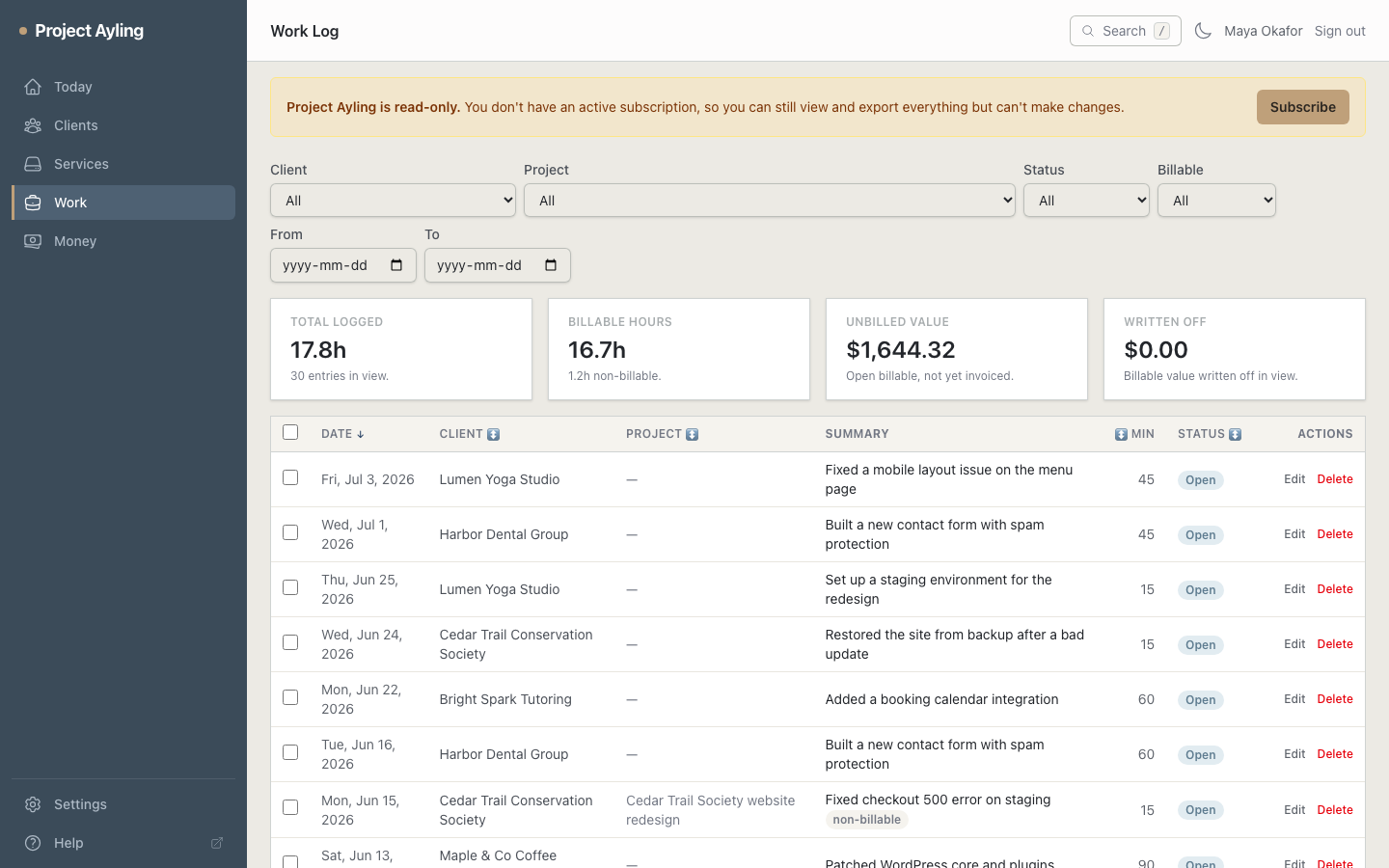
Every entry lives in the work ledger (under Work), with filters for client, project, status, billable, task type, and date. Edit entries inline, and select several at once to act in bulk – write off, mark plan-included, toggle visibility, or assign to a project.
From logged to billed
Billable entries that haven’t been invoiced yet show up as money waiting on Today and in the invoice composer. Putting an entry on an invoice marks it invoiced, so the same work can never be billed twice.
Where to next
- Group related work with projects.
- Turn unbilled time into a bill: building an invoice.