

The Today screen
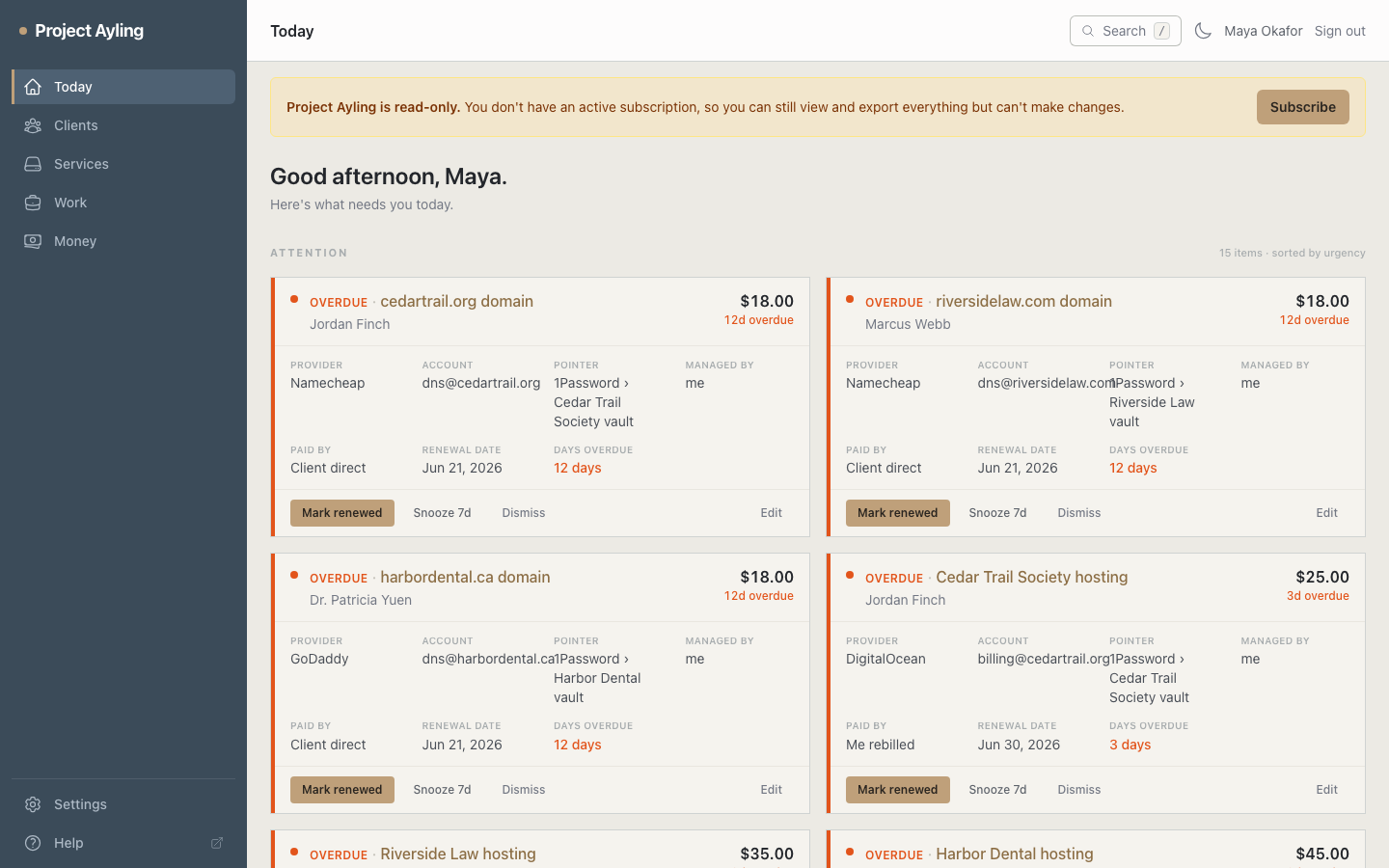
Today is where Yven opens every time you sign in. Instead of a wall of charts, it shows a single ranked list – the attention queue – of the things that genuinely need a decision from you, most urgent first. Clear it, and you’re done for the day.
What lands in the queue
Yven builds the list live from your own data and orders it by urgency:
- Overdue renewals – a service whose renewal date has already passed.
- Renewals due this week – anything due in the next seven days.
- Renewals due soon – the rest of the next month (eight to thirty days out).
- Money waiting – a client with unbilled work ready to invoice.
- Stale clients – a client you haven’t logged anything against in a while.
A count summary above the list – “N overdue · N this week · N later” – gives you the shape of the day at a glance. Renewals further out than thirty days don’t clutter the list – they’ll surface as their date approaches. To look further ahead, open Renewals, which buckets everything from overdue out to ninety days and beyond.
Cards or Detail layout
A toggle above the queue switches between two views, and Yven remembers your choice:
- Cards – every item as an always-expanded card, quickest for scanning a short list.
- Detail – items grouped by due date with a detail pane, better once the list gets long. Any day with two or more renewals due gets a Renew all button that clears the whole group in one click.
Acting without leaving the page
Each item has its actions built in, so you can clear it in one click:
- Renew – advances the date by the service’s renewal period. If the service is one you manage, the Log work dialog opens straight away – pre-filled with the client, site, and a suggested summary – so you can capture the renewal work before moving on.
- Snooze – hides the item for a while without touching the real renewal date.
- Dismiss – drops the item from the queue when it doesn’t need you.
Money and stale-client items link straight to the place you’d act – the invoice composer or the client – so the queue stays a to-do list, not a dead end. To see the bigger financial picture behind “money waiting,” open the Money screen.
Snooze and dismiss are remembered
Snoozing or dismissing is sticky: Yven remembers it so the same item doesn’t reappear the next morning. A snoozed item comes back on its own once the snooze passes; a dismissed one stays gone until its underlying situation changes.
Active clients
Below the queue, an Active clients card lists your active clients and each one’s next renewal – a quick-glance reference for clients that don’t currently need action.
Where to next
- Understand how renewal dates drive the queue in Renewals.
- Turn “money waiting” into a bill in Work & invoicing.