
A renewal date is about the most predictable thing in a client book. It's printed on a calendar. Nobody has to guess it. It can still slip.
A relative of mine is an aspiring author. They had a website on a domain of their own, and used the domain for their email too. The domain expired. Nobody's attention was on the date, and once it lapsed, the domain was lost. A domain carries more than a website: when it goes, every email address on it stops working. Theirs went with it and they came to me afterward to see what could be recovered. Fortunately, we were able to get the domain back before it was snapped up by a reseller.
I'm not telling this to point at them. I'm telling it because the date was the one thing nobody was watching, and it took everything else down with it. If you look after sites for other people, that call can land on you.
My theory is that the date lives in the wrong place. It's in a registrar's email, or a billing portal you rarely open, or your memory. None of those are places you look on a normal Tuesday.
So in Yven, the date lives where you start your day.
The Today screen is one ordered list. Overdue renewals come first, then renewals due in the next 30 days, then money waiting (unbilled work, by client, with the date of the oldest entry), then clients with no billable work logged in 90 days. Anything further out than 30 days stays off Today, so the list only has things you can act on. (The Renewals page still groups everything: overdue, 7 days, 30, 90, later.)
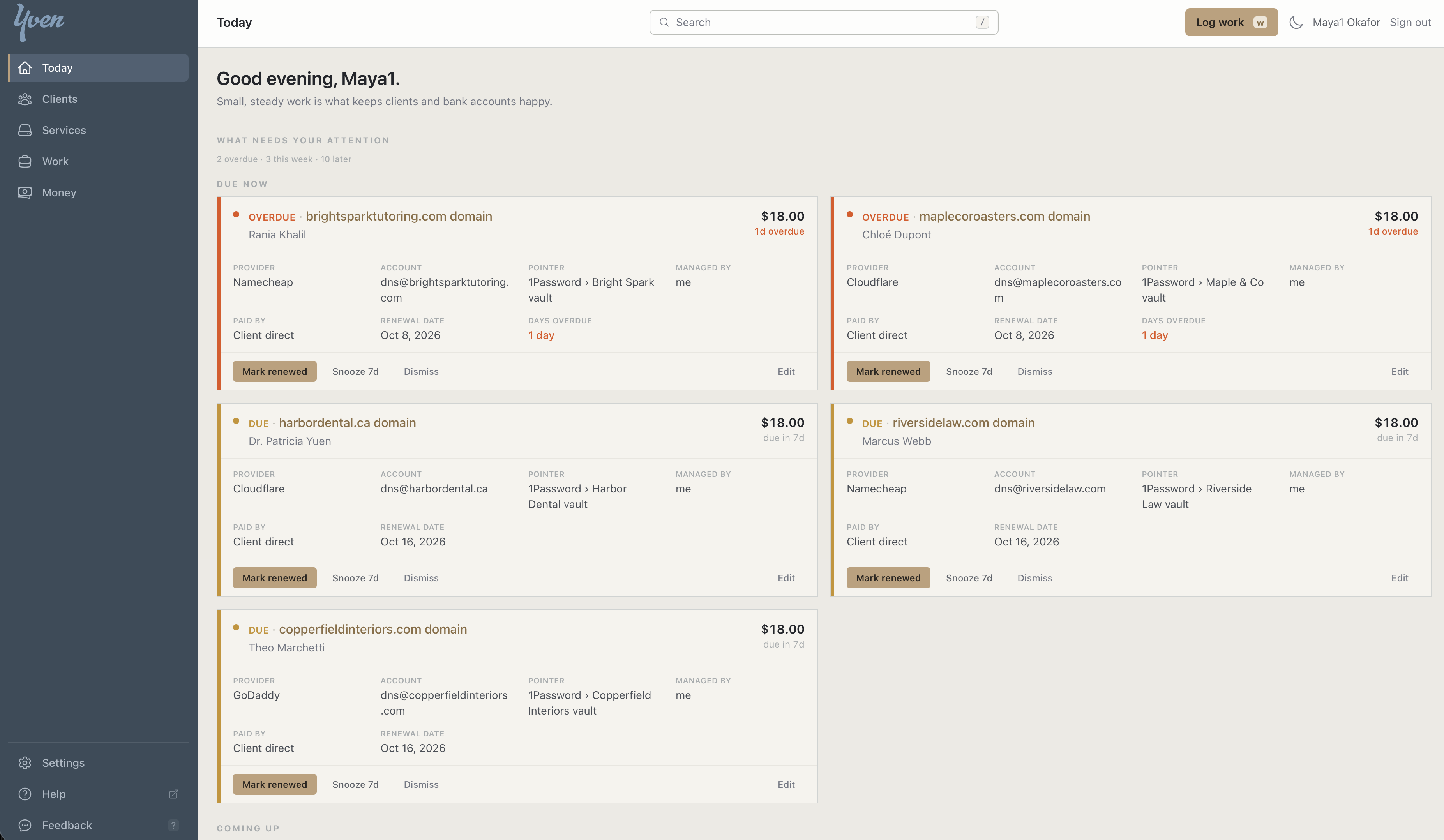
When you add a domain, Yven looks up the date. It asks the registry for the expiry date (RDAP first, WHOIS as the fallback) and fills it in, so you don't have to log into the registrar. It doesn't work for every domain, because some registries publish nothing. When that happens, you type the date yourself.
Every service also says who pays: I pay and rebill the client, I pay and absorb it, or the client pays the provider directly. That matters on renewal day. Mark a rebilled service as renewed and Yven records a charge at your rebill price, ready for the next invoice. Absorbed or client-direct services create no charge. Marking it renewed also moves the date forward by the renewal period, so you don't edit it by hand.
You get one email a day at most. Yven sends a single digest at the hour you set, in your timezone (8am by default). Overdue items are in it every day until you deal with them. Upcoming items appear on the lead days you choose – say, 30, 14, and 7 days out. If nothing qualifies that day, nothing is sent.
Each item can be marked renewed, snoozed for 7 days, edited, or marked lapsed. Lapsed matters more than it sounds, because a service you've dropped shouldn't nag you forever.
Services set to auto-renew are left off the list by default. You can include them with a filter, and if an expired card is the failure you worry about, I'd turn that filter on.
None of this is clever. The list is just already sorted when you open it.
If you keep your renewals somewhere else today – a spreadsheet, a calendar, your inbox – I'd like to know where, and what made you pick it. The contact page reaches me.
Try it: Yven has a 21-day trial. Start your trial at yven.ca.